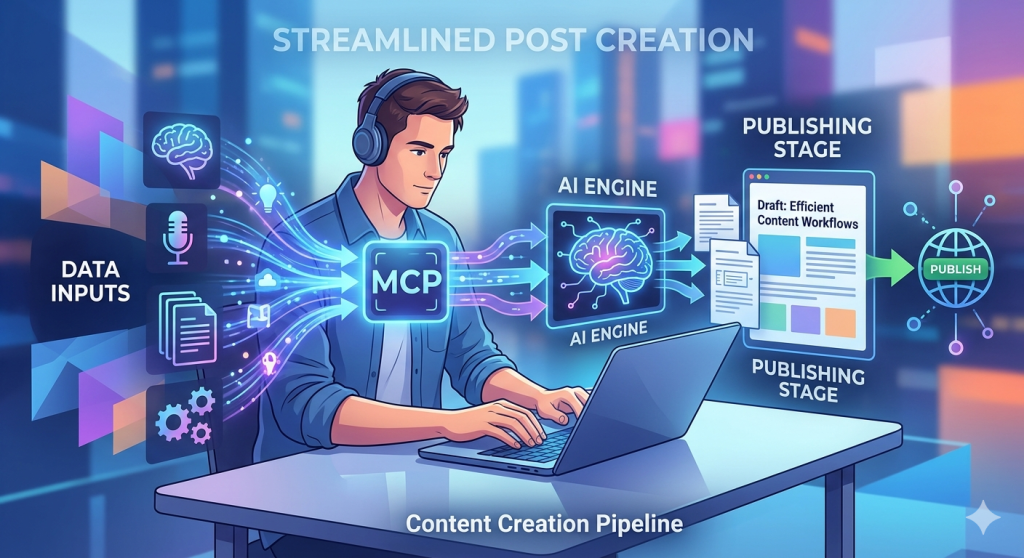
How I Used Claude to Write and Publish This Very Blog Post

What you’re reading right now is a little experiment in AI-powered publishing. This post was written, drafted, and sent to WordPress by Claude — Anthropic’s AI assistant. No copy-paste. No switching tabs. Just a conversation.

Here’s how it works — and how you can do it too.

What Is the WordPress MCP Connector?

MCP stands for Model Context Protocol — an open standard that lets AI assistants like Claude connect directly to external tools and services. WordPress.com has built an MCP server that gives Claude the ability to read and write content on your site, all from within a chat conversation.

Think of it as giving Claude a direct line to your WordPress dashboard — without you ever having to open it.

Step 1: Enable the WordPress MCP Connector

First, you need to turn on MCP access for your WordPress.com account:

  1. Go to wordpress.com/me/mcp
  2. Enable the abilities you want Claude to have — at minimum, enable user-sites and content authoring
  3. Copy your MCP server URL (it will look something like https://public-api.wordpress.com/wpcom/v2/mcp/v1)

Step 2: Connect It in Claude.ai

Next, connect the WordPress MCP server inside Claude:

  1. Open Claude.ai and go to Settings → Integrations
  2. Find WordPress.com in the connectors list and click Connect
  3. Authenticate with your WordPress.com account when prompted

Once connected, Claude can see your sites and interact with them directly from chat.

Step 3: Ask Claude to Write a Post

This is the fun part. Just tell Claude what you want:

“Let’s write a blog post for useaitolearn.net using WordPress.”

Claude will ask about the topic, draft the content, show it to you for review, and — once you give the go-ahead — create it as a draft directly on your site. You stay in control: nothing gets published without your confirmation.

The Meta Part

Here’s the twist: this post is the example.

The conversation that produced this blog post started with exactly that prompt above. Claude connected to this WordPress site, pulled the theme context, drafted the content, and submitted it — all without me ever opening the WordPress editor.

It’s a small but genuine glimpse at what AI-assisted publishing looks like in practice. Not AI replacing the writer, but AI handling the mechanics so the writer can focus on the idea.

Why This Matters for Learning

At Use AI to Learn, we’re always exploring how AI tools can reduce friction and help you do more. The WordPress MCP connector is a great example: instead of learning a new interface or workflow, you just… talk. And the thing gets done.

That’s the future of AI-assisted work. And you can try it today.


Want to try it yourself? Start at wordpress.com/me/mcp and connect Claude to your site. Then just start a conversation.


Comments

30 responses to “How I Used Claude to Write and Publish This Very Blog Post”

  1. Rachel M. Avatar
    Rachel M.

    This is wild — I literally just spent 20 minutes copy-pasting between Claude and WordPress before reading this. Setting up the MCP connector tonight. Thanks for the walkthrough!

    Like

    1. UseAItoLearn Avatar
      UseAItoLearn

      Ha! We’ve all been there. The copy-paste loop is real. Hope the setup goes smoothly — let us know how it goes!

      Like

  2. Dan K. Avatar

    The meta angle here is great. A post about AI publishing, written and published by AI. Did the irony feel intentional the whole time or did it just work out that way?

    Like

    1. UseAItoLearn Avatar
      UseAItoLearn

      Both, honestly! The meta angle was intentional from the start, but it kept getting more layered as we went. There’s something almost recursive about asking AI to document what AI just did.

      Like

  3. Priya S. Avatar
    Priya S.

    I work in content and this is exactly the kind of workflow shift that’s hard to explain to people until they see it. It’s not AI replacing writers — it’s AI removing the stuff that was never really writing in the first place. Great framing in this post.

    Like

  4. Mike T. Avatar
    Mike T.

    Just tried this and it worked on the first attempt. Took maybe 5 minutes to set up. Why didn’t I know about this sooner?

    Like

    1. Lena X. Avatar
      Lena X.

      For anyone on the fence — just do it. The setup is genuinely 5 minutes and the first post felt almost too easy.

      Like

  5. Jess L. Avatar
    Jess L.

    Question: does Claude maintain your existing brand voice or does it default to its own style? I manage a few different blogs with very different tones and that’s always my concern with AI writing tools.

    Like

    1. UseAItoLearn Avatar
      UseAItoLearn

      Great question Jess. Claude defaults to its own style unless you guide it. The trick is to give it examples of your existing posts upfront and say something like “write in this voice.” It picks up on tone, sentence length, even punctuation habits pretty quickly. A follow-up post on that is a great idea actually.

      Like

  6. Tomasz B. Avatar
    Tomasz B.

    Been using WordPress for 12 years and this is genuinely the most interesting development I’ve seen in a long time. MCP feels like it could change how the whole ecosystem works.

    Like

  7. Nina R. Avatar
    Nina R.

    I showed this to my whole marketing team today. Three of them immediately asked IT to help them set it up. That’s a pretty good signal.

    Like

  8. Sam O. Avatar

    MCP is so underrated right now. People are still thinking of AI as a chat box but it’s actually becoming an operating layer for software. This post is a great practical example of that shift.

    Like

  9. Carla V. Avatar
    Carla V.

    I teach digital marketing at a community college and I’m adding this to my curriculum next semester. This is exactly the kind of practical AI application students need to see.

    Like

  10. Greg H. Avatar
    Greg H.

    As a freelance writer I was honestly a little nervous clicking on this post. But the framing is right — Claude handles the mechanics, not the ideas. I can get behind that.

    Like

  11. Amy C. Avatar

    Does this work with self-hosted WordPress or only WordPress.com? I’m on my own server with Bluehost.

    Like

    1. UseAItoLearn Avatar
      UseAItoLearn

      Amy — right now the WordPress MCP connector is WordPress.com only. Self-hosted WordPress.org doesn’t have it natively yet, though there are community projects working on it. Worth keeping an eye on.

      Like

  12. Luke F. Avatar
    Luke F.

    We run a startup blog and publishing has always been a bottleneck. This could seriously unblock us. Bookmarking and trying this week.

    Like

  13. Helen W. Avatar
    Helen W.

    I’ve been testing a lot of AI writing tools this year and most of them feel like glorified autocomplete. This is different because Claude is actually taking actions, not just generating text. That’s a meaningful distinction.

    Like

  14. Omar J. Avatar
    Omar J.

    Shared this in our agency Slack and it started a whole debate about whether clients should know their content is being published this way. Curious what others think about disclosure.

    Like

    1. Sam O. Avatar

      Exactly right Omar. I think transparency is table stakes at this point. But there’s a difference between “AI wrote this without human input” and “a human used AI as a publishing tool.” This post is clearly the latter.

      Like

      1. Greg H. Avatar
        Greg H.

        Totally agree with Sam. Using AI to publish is no different than using WordPress itself to publish. The tool doesn’t write the idea.

        Like

  15. Becca T. Avatar
    Becca T.

    From an SEO standpoint I’m curious how this affects things like schema markup, meta descriptions, and canonicals. Is Claude handling any of that or is it purely content?

    Like

    1. UseAItoLearn Avatar
      UseAItoLearn

      Becca — Claude can handle meta descriptions and excerpts through the MCP tools. It won’t auto-optimize everything but if you ask it to, it will. Schema and canonicals are more involved — great topic for a dedicated post!

      Like

  16. Felix N. Avatar
    Felix N.

    The part about Claude handling mechanics so writers focus on ideas is what resonates with me. I spend way too much time in the WordPress dashboard doing things that have nothing to do with thinking or writing.

    Like

  17. Sophie A. Avatar
    Sophie A.

    I work at a nonprofit with a tiny team and no dedicated content person. This is the kind of thing that could actually make a real difference for us. Thank you for writing it up so clearly.

    Like

  18. Aaron C. Avatar
    Aaron C.

    Honestly the thing that got me was “no copy-paste, no switching tabs.” That’s half my day gone right there. Signing up for Claude Pro today.

    Like

  19. Maya P. Avatar
    Maya P.

    I keep waiting for AI tools to feel gimmicky and this one just… doesn’t. It solves a real problem in a sensible way. Good post.

    Like

  20. Chris W. Avatar
    Chris W.

    Would love a follow-up post showing what the actual conversation looked like in Claude when you built this. The prompt chain behind the scenes would be fascinating to see.

    Like

    1. UseAItoLearn Avatar
      UseAItoLearn

      Chris — that’s actually a great idea for a follow-up post. Showing the raw conversation would make it much more tangible for people. Adding it to the content calendar now!

      Like

  21. Lena X. Avatar
    Lena X.

    Read this, set it up, wrote my first post via Claude in about 15 minutes. The future is now apparently.

    Like

Leave a comment